Independent mobile-access guide for Kenya – updated 24 August 2026
CHEXX App and Mobile Access in Kenya
CHEXX can be used on a phone in three practical ways: directly in a mobile browser, as an installed Progressive Web App (PWA), or through the CHEXX Telegram Mini App. The current official PWA page supports Android, iOS, Windows and macOS installation through compatible browsers. CHEXX does not list a native Google Play or Apple App Store app, so users should not waste time looking for an official store download or an APK. The full picture is in our CHEXX review for Kenya.
For most Kenya-based users, the browser is the lowest-friction starting point. The PWA is better if you want a home-screen icon and faster repeat access, while the Telegram Mini App is useful if Telegram is already part of your daily workflow. These access methods lead to the same broader CHEXX ecosystem; they do not create separate betting accounts or separate balances. All three routes use the same CHEXX account.
Three ways to use CHEXX on mobile
| Access method | What you use | Best for | Main trade-off |
|---|---|---|---|
| Mobile website | Your normal browser | Trying CHEXX without installing anything | You open it like any other website |
| PWA | Browser-installed home-screen app | Frequent access and a more app-like launch | It is still web technology, not a native store app |
| Telegram Mini App | @ChexxBetBot in Telegram | Users who prefer Telegram as an access layer | Telegram becomes part of the login/access workflow |
The important distinction is not which option is “more official”. All three are CHEXX access routes. The useful question is which one fits your device habits and security preferences. A shared or work phone, for example, may be better suited to ordinary browser access than a persistent home-screen shortcut or Telegram session.
Mobile browser: the simplest starting point
Opening CHEXX in a mobile browser requires no separate download. This is the clearest way to test navigation, check game or sportsbook availability and decide whether the interface works well on your screen before installing anything. It also avoids the common mistake of searching third-party APK repositories for a file that CHEXX does not provide as part of its official mobile access.
For a Kenya-based user, browser access also makes it easier to evaluate the full workflow before funding. CHEXX is crypto-centred, so mobile convenience does not remove the need to acquire a supported crypto asset externally and use the correct blockchain network. If the funding path matters more than the interface, read the CHEXX deposit Kenya before choosing a mobile setup.
How the CHEXX PWA works
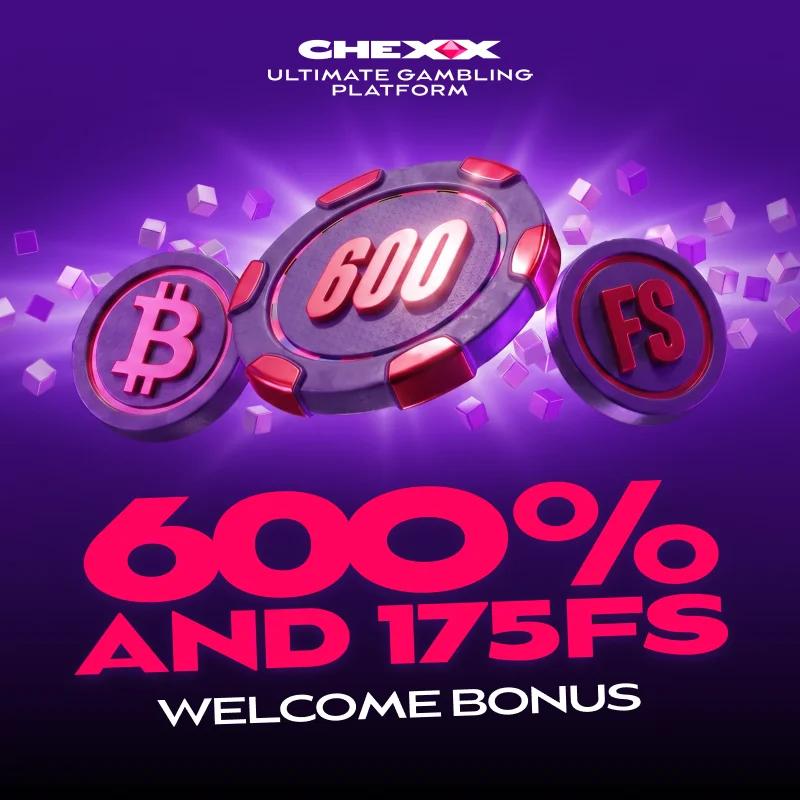
A Progressive Web App is a website that can be installed from a supporting browser and launched from the device home screen or desktop. CHEXX’s current PWA page gives installation routes for Chrome on Android, iOS, Windows and macOS, Safari on iOS and macOS, and Samsung Internet on Android. That makes the PWA the closest CHEXX option to a conventional app icon without requiring a native app-store package.
On Android, the official instructions use the browser’s “Add to Home Screen” flow. On iOS, CHEXX provides home-screen installation instructions through Chrome or Safari. Desktop users can also install through supported browsers. The exact wording of browser menus can change after operating-system or browser updates, but the important principle remains the same: start from the official CHEXX website and use the browser’s installation control.
Why the PWA can be preferable to a native app
The PWA route reduces dependency on an app-store listing. Updates can be delivered through the web product rather than waiting for a user to install a new binary from a store. It also keeps the access path consistent across Android, iPhone and desktop devices.
That does not make a PWA universally better. Native apps can integrate more deeply with operating-system features, while a PWA depends on browser support and web permissions. CHEXX’s own PWA page highlights fast loading, notifications and home-screen access, so the practical value is convenience rather than a claim that the PWA is technically identical to a native Android or iOS application.
No native Google Play or App Store app listed
Avoid unofficial downloads
CHEXX does not identify a native Google Play or Apple App Store application. Do not treat an unrelated APK, cloned store listing or download mirror as an official CHEXX app merely because it uses the brand name or logo.

This is an important safety distinction. Users searching “CHEXX app” can encounter download-style pages that imply a native package exists. The official route is the official web/PWA flow. If CHEXX later launches a native store app, confirm it through CHEXX and the relevant official store listing before relying on any download.
Telegram Mini App: play access, not support
CHEXX lists Telegram Mini App access through @ChexxBetBot. This is the play/access bot. It is distinct from @ChexxSupportBot, which is the support channel for customer assistance. Keeping those names separate matters because a user looking for help should not assume the gameplay bot is the support desk.
A Telegram Mini App can be convenient if you already use Telegram extensively, but it also means your Telegram session becomes part of the practical access environment. Protect the Telegram account with appropriate security settings, do not share login codes, and verify the bot handle before interacting with it. Brand impersonation is a general risk on messaging platforms, so matching the exact handle is more useful than trusting search-result names.
Which option is best for a Kenya-based user?
| If your priority is… | Start with… | Why |
|---|---|---|
| No installation | Mobile website | Fastest way to evaluate the product with minimal device changes |
| One-tap repeat access | PWA | Adds a home-screen or desktop launch point |
| Telegram-centred use | Telegram Mini App | Keeps access inside a tool you may already use daily |
| Sports betting on a phone | Browser or PWA | Both keep the full web sportsbook workflow available |
The choice does not change CHEXX’s core payment model. You still need a supported cryptocurrency and the correct network. It also does not change the account rules: registration and verification are account-level matters, not separate rules for each mobile access method. For that distinction, use the CHEXX registration.
On a personal phone, the PWA can reduce repeat navigation. On a shared device, ordinary browser access may be preferable because it leaves fewer persistent shortcuts. Whichever route you choose, sign out when appropriate and keep control of the device used for account access.
Access method does not create a different account
Browser, PWA and Telegram Mini App are access layers for the CHEXX service, not three different product accounts. Choosing the PWA does not change the underlying payment model, and opening CHEXX through Telegram does not create a separate set of casino or sportsbook rules. This is useful when comparing mobile options because the decision can stay focused on convenience, device security and how easily the access method can be recovered.

A Kenya-based user can therefore test the ordinary mobile website first, then add the PWA or Telegram route only if it improves repeat access. There is no need to search for a native store package simply to obtain the same account features.
Mobile use for sportsbook and casino
CHEXX combines sportsbook and casino products in one account. The official PWA page describes access to both betting and casino play, so a user does not need separate installations for each vertical. If sports are your main use case, the CHEXX sportsbook explains the sports coverage and odds formats without repeating mobile-installation instructions.
On a smaller screen, the best interface is the one that lets you check critical details before confirming an action. For sportsbook users that means market, selection and odds; for casino users it means game title and stake. Home-screen convenience should not become a reason to move faster than you would on desktop.
Practical mobile security checklist
- Start from the official CHEXX domain rather than a third-party download page.
- Use the official browser installation control for the PWA.
- Do not install an APK merely because it is labelled as a CHEXX app.
- Verify @ChexxBetBot when using the Telegram Mini App and keep it distinct from the support bot.
- Keep browser, operating-system and Telegram security settings current.
- Before depositing from a phone, double-check the crypto asset, network and wallet address.
Browser first, PWA for repeat use, Telegram by preference
CHEXX mobile access is straightforward once the terminology is clear: website, PWA and Telegram Mini App are the three listed routes. The official PWA page currently supports installation workflows across Android, iOS, Windows and macOS browsers. CHEXX does not list a native Google Play or App Store app, so the safest approach is to use the official CHEXX web/PWA route rather than searching for an APK. For most Kenya-based users, start in the browser, install the PWA only if repeat access is useful, and choose Telegram only if that environment fits your security and usage habits. An account comes first: registration.
For the full product trade-offs beyond mobile access, return to the CHEXX Kenya review.






 Classic BlackjackClassic
 Ultimate Blackjack with RachaelLive-style
 Atlantic City BlackjackClassic
 Turbo BlackjackFast-play
 Blackjack Surrender OriginsSurrender
 Double Exposure BlackjackDouble Exposure
 Premier Blackjack with Side BetsSide Bet
 Blackjack 21 ClassicClassic
 Vegas Downtown Blackjack GoldGold Series
 Perfect Pairs BlackjackSide Bet
 Single Deck Blackjack GoldSingle Deck
 European BlackjackMultihand
 Multihand BlackjackMultihand
 Blackjack Lucky LadiesSide Bet
 American BlackjackClassic
 Mega Fire Blaze RouletteMultiplier
 Mini Roulette 3DMini
 American RouletteClassic
 Dragon RouletteThemed
 Multifire RouletteMultiplier
 French RouletteNetEnt
 Quantum RouletteMultiplier
 Auto RouletteSwitch Studios
 European RouletteClassic
 Double Ball American RouletteDouble Ball
 Monopoly Roulette TycoonThemed
 Lucky RouletteClassic
 RouletteRelax Gaming
 Who Wants to Be a Millionaire RouletteThemed
Written by the editors at Chexx Casino.